
| Vaše cena | 1 262,60 Kč |
| Vaše cena bez DPH | 1 043,50 Kč |
| Dostupnost | Skladem 3 ks |
| Odesíláme zítra | |
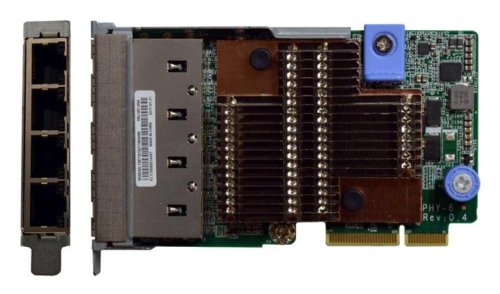
The Intel Ethernet Connection X722 shares the same core and drivers as the Intel X710 adapters making driver management easier of existing customers.
ThinkSystem LOM adapters are cost-effective adapters that take advantage of the X722 controller embedded in Intel Xeon Processor Scalable Family chipset and offer the flexibility advantages of a PCIe adapter while supporting integrated networking features, such as Wake-on-LAN and direct connectivity to the XClarity Controller management processor for NC-SI-compliant systems management.
The Intel X722 controller is optimized for data center, cloud, and mobile applications and includes the following features:
•VXLAN/NVGRE Hardware Offloads: These stateless offloads preserve application performance for overlay networks. With these offloads, it is possible to distribute network traffic across CPU cores. At the same time, the controller offloads LSO, GSO, and checksum from the host software, which reduces CPU overhead.
•Low latency: Intel Ethernet Flow Director delivers hardware-based application steering and Intel Data Direct I/O makes the processor cache the primary destination and source of I/O data rather than main memory.
•Virtualization performance: With Intel Virtualization Technology (VT), the controller delivers outstanding I/O performance in virtualized server environments. The controller reduces I/O bottlenecks by providing intelligent offloads for networking traffic per virtual machine (VM), which enables near-line rate speeds for small packets and supports almost an unlimited amount of isolated traffic flows so that you can scale your cloud environment.
•Next-generation VMDq: The controller support up to 128 VMDq VMs and offer enhanced Quality of Service (QoS) feature by providing weighted round-robin servicing for the Tx data. The controller offloads the data-sorting functionality from the hypervisor to the network silicon, which improves data throughput and CPU usage.
•SR-IOV implementation: Provides an implementation of the PCI-SIG standard for I/O Virtualization. The physical configuration of each port is divided into multiple virtual ports. Each virtual port is assigned to an individual VM directly by bypassing the virtual switch in the Hypervisor, which results in near-native performance.
•iWarp RDMA support implements kernel bypass and direct data placement and allows for more efficient high-speed networking by eliminating queues and network related interrupts
•VM load balancing: Provides traffic load balancing (Tx and Rx) across VMs that are bound to the team interface. It also provides fault tolerance if a switch, port, or cable.
•Auto-detect (PnP) feature for the LOM adapters, enabling you to change LOM adapters (eg from a 1Gb LOM to 10 Gb LOM) and the network interface will automatically reconfigure during the boot process